
Grow With Simple Email Marketing In Brevo
Fluent Growth helps turn Brevo into a clear, friendly tool instead of a confusing dashboard. With short guides and real examples, beginners and small teams learn how to set up email marketing, talk to customers, and support long‑term growth in steady steps.
Clear Help For Everyday Users
Screenshots, plain words, and short checklists walk through each task in Brevo. Readers always know what to click next, even if they usually avoid new tools.
Built Around Brevo From Day One
Every tutorial is written for Brevo first, from basic lists to simple automation. When a new feature appears, guides are updated so lessons match what people see on their own screen.
Learn Brevo Step By Step
Use Brevo To Turn New Visitors Into Steady Growth
Brevo brings forms, email campaigns, and simple automation into one place, which makes it easier to turn website visitors into subscribers and paying customers. Fluent Growth breaks each part into clear steps, so readers can set things up in a few short sessions instead of weeks of guessing.

Collect Contacts With Forms And Pop‑Ups
Brevo lets users build clean signup forms and pop‑ups that match their site. Fluent Growth shows where to place them and how to connect them to lists, so more visitors choose to leave their contact details.

Send Helpful Campaigns That Stay On Brand
With Brevo’s editor, it is easy to drag blocks into place, add images, and write short messages that match the brand style. Guides on Fluent Growth explain how to plan simple campaigns that share news, offers, and tips without feeling heavy.

Follow Up Automatically After Signups
Brevo can send welcome sequences, reminders, and small check‑ins whenever a new contact joins a list. Fluent Growth explains which basic flows to set up first and how to test them, so follow‑up happens on time even when the team is busy.
Everything Needed To Start
Fluent Growth Makes Brevo Easy For New Marketers
Brevo gives people who are new to email marketing a clear place to start. Within a short time, they can build a list, write a basic campaign, and see simple numbers that show how many people opened and clicked. Fluent Growth turns those tools into short, calm lessons so readers can move one step at a time instead of feeling rushed.
Each guide covers one task, such as adding a sender name, creating a list, or setting up the first welcome email. There is no need to guess which button to press or which menu to use, because each step is shown in order with screenshots and notes.
No Past Experience Needed
People can open Brevo for the first time and still send a simple campaign by following the steps. Clear menus, sample layouts, and starter guides help them move from blank screen to real send without feeling stuck.
Check Campaigns From Any Device
Results can be checked from a laptop, tablet, or phone whenever there is an internet connection. This means users can watch signups and opens even when they are away from the office.
Begin On Free, Grow When It Makes Sense
Brevo’s free plan is enough to test lists, welcome emails, and small newsletters. When sending limits feel too tight, readers can move to paid plans that add more volume and extra tools, all while staying inside the same account.

Why Email Still Matters
Email Marketing With Brevo Can Support Real Business Growth
Email gives direct access to people who asked to hear from a brand. When combined with Brevo and clear planning, it becomes a simple way to share offers, teach, and remind customers without depending on social feeds or ads. Fluent Growth shows how to build regular sending habits, so each new contact has a better chance of turning into a long‑term customer.
Built For Many Types Of Businesses
Brevo works for online shops, service providers, and content creators. Fluent Growth explains different use cases, from simple welcome emails for freelancers to product updates for small stores.
Tools That Work Together
Forms, campaigns, basic CRM features, and automation sit inside one account. Guides show how to connect them, so new subscribers flow into the right lists and get the right messages without manual work.
Start Free And Learn As You Go
Readers can sign up through the buttons on this site, use the free plan to learn the basics, and then decide later if they want higher sending limits. Fluent Growth’s tutorials are written to match this path, starting small and adding more as skills grow.
Key Brevo Tools Fluent Growth Helps You Use
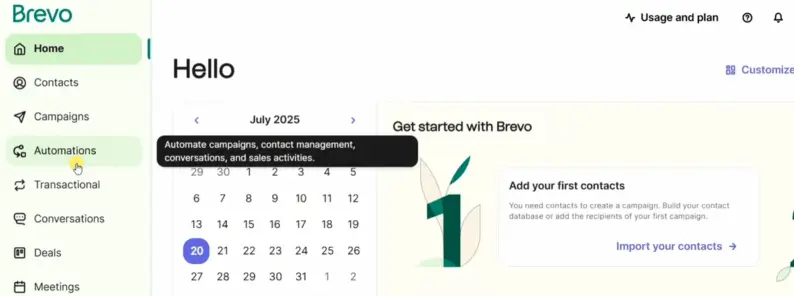
Why Fluent Growth Recommends Brevo
“Fluent Growth focuses on Brevo because it gives beginners a fair starting point with clear tools and a free plan. List building, campaigns, and simple automation all live in one account, which keeps things easier to manage. When readers follow the guides on this site and use the buttons here to open their account, they can move from first setup to regular sending without switching platforms.”
When You Outgrow The Free Plan
Move Up To Paid Brevo Plans When It Feels Right
From $9 / month*
As lists and sending needs grow, Brevo offers paid plans that raise monthly limits and add more options. These higher plans keep the same editor, forms, and flows, so users do not have to learn a new tool. Readers can always check current prices on the official signup screens reached through the buttons on this site.
Ready To Learn Brevo In Simple Steps?
Start With Fluent Growth Today
Fluent Growth is here to guide beginners and small teams from first login to steady sending. With clear lessons, screenshots, and short checklists, readers can build lists, write messages, and set up basic automation without feeling lost. The buttons on this site lead straight to Brevo’s signup process, so visitors can learn and apply the steps side by side.
Start Your Free Account
Use the buttons on Fluent Growth to open a free Brevo account. Then follow the beginner guides to set up lists, forms, and a first welcome email in a simple, calm way.
Ask A Question
Need help with a step or topic on Fluent Growth? Reach the team at admin@fluentgrowth.site and share what you are stuck on, so we can point you to the right guide or create a new one.